YourPods.Your podcasts. Your rules.
The pay-once podcast app for iPhone, iPad, Mac, Watch & CarPlay.
$4.99 once. Every feature included. No ads, no tracking.
Syncs with your Nextcloud or any gPodder server — or no server at all.
Available on iPhone, iPad, Mac, Apple Watch & CarPlay
☁️ Your sync, your choice
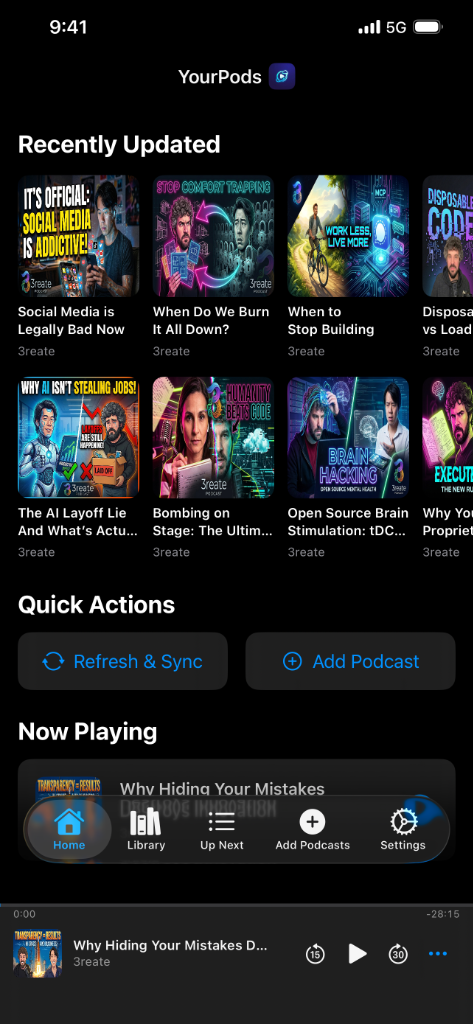
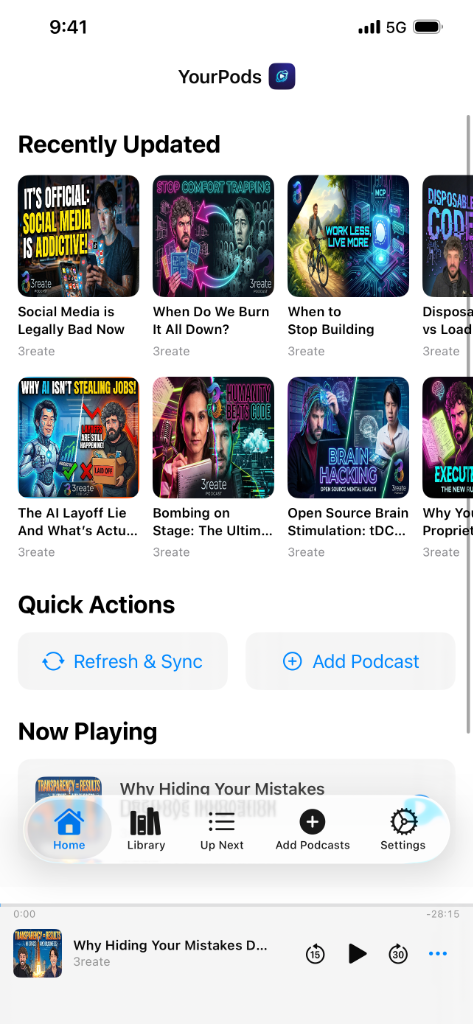
Pay once. No subscriptions.
The app is yours for one price. Sync however you like — our cloud, your server, or not at all. Pro is an optional service you can happily ignore.
$4.99, once.
Every feature is in the app the moment you buy it — Trim Silence, CarPlay, Apple Watch, AutoPilot, P3 privacy, and episode notes with Markdown, Obsidian, and Nextcloud export. No subscriptions, no ads. GPLv3 open source — build it yourself if you like.
Your server. No subscription.
Sync your library with your own Nextcloud gPodder Sync, NextPod, or RePod — or any gPodder server. Sign in through your browser, and send your episode notes to the same Nextcloud. No account with us, no cloud fees. Prefer no server at all? Vault Mode keeps everything on-device.
A hosted extra, not a gate.
YourPods Pro is a separate cloud service — web player, hosted sync, stats — for $20/year for life if you subscribe before January 1, 2027. It funds independent development. The app is complete without it, and nothing in the app is locked behind it.
Why YourPods?
See how we stack up against other podcast apps.
| Feature | YourPods | Other Podcast Apps |
|---|---|---|
| Price | $4.99 USD once | Free + $10–40/yr subscriptions |
| Apple Watch | ✅ Included | Paid add-on or unavailable |
| Trim Silence | ✅ Included | Often subscription-only |
| Private Feeds | ✅ Built-in | Limited or unsupported |
| Sleep Timer | ✅ Timed + DriftOff Mode | Basic timer only |
| Tracking | Zero — ever | Analytics, ad tracking, or both |
| Tracker Blocking | 🛡️ P3 strips 39 tracker prefixes | Not available |
| Your Data | Local or self-hosted | Stored on developer servers |
| CarPlay | ✅ Full dashboard + controls you choose | Basic controls |
| Open Source | ✅ GPLv3 — build it yourself | Proprietary / closed source |
| Web Player | 🌐 Full browser player — optional Pro service | Rarely available |
| Podcast Notes | 📝 Timestamped notes, free — export to Nextcloud, Obsidian, or Markdown | Not available |
| Listening Stats | 📊 Per-podcast breakdowns | Often subscription-only |
Trim Silence. Save hours.
Our audio engine skips long pauses as they play and leaves the natural rhythm of speech alone. Voice Boost makes voices clearer, and Normalize Loudness keeps every show at the same level — none of it can clip.
- Trim Silence skips long pauses and leaves short ones alone
- Voice Boost, Normalize Loudness, and Volume Boost, as a default or per show
- Playback speed per show, with a default for everything else
- Sleep Timer with countdown presets and DriftOff Mode
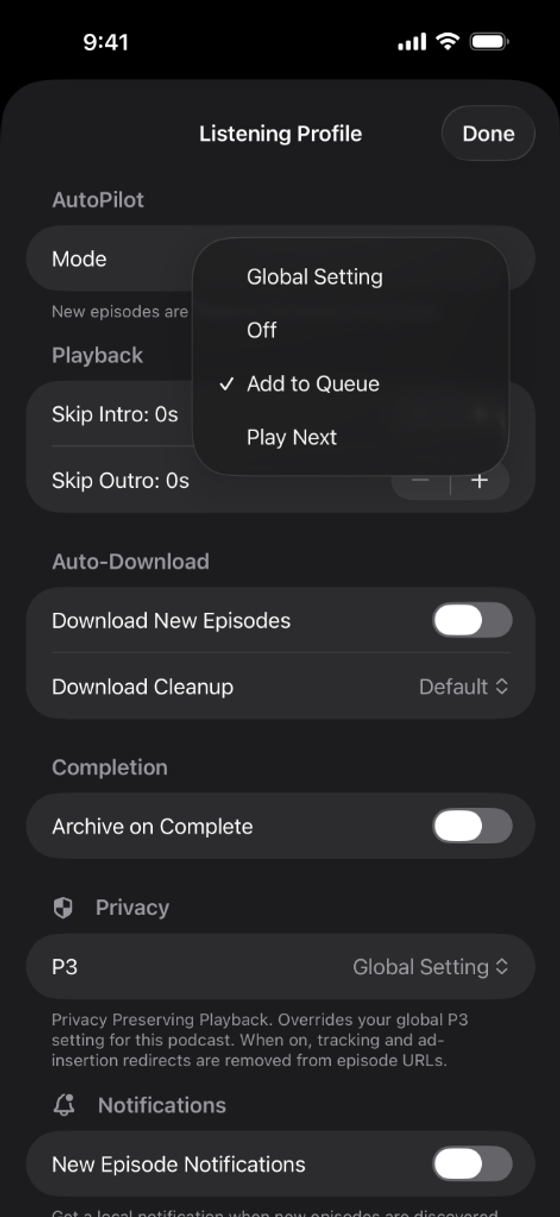
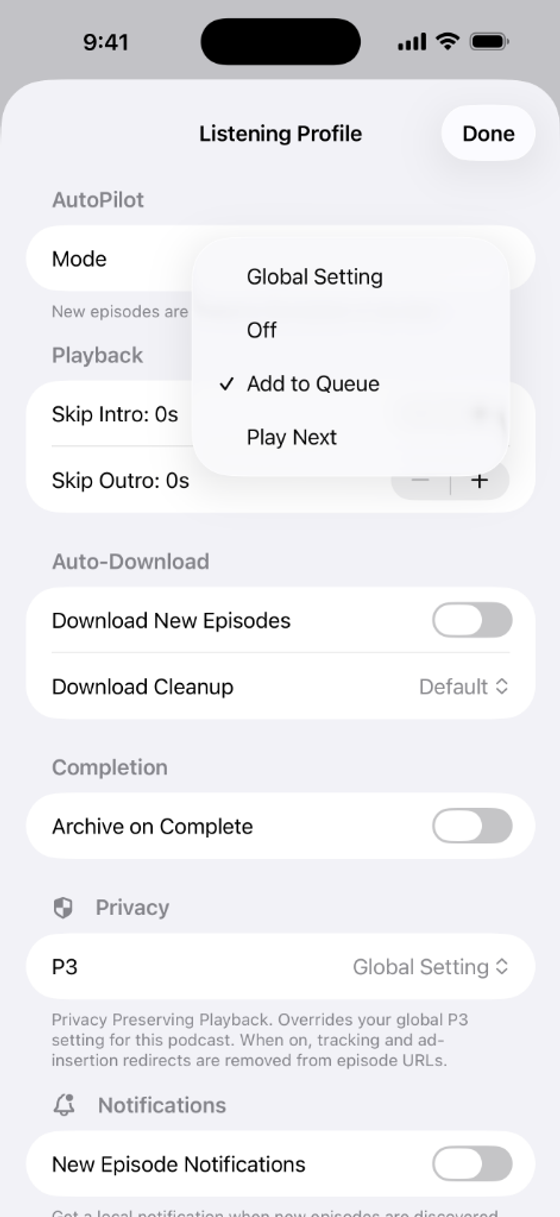
AutoPilot runs your queue.
New episodes auto-add to Up Next, priority episodes jump to the top, and every show follows its own Listening Profile. Drag to reorder anytime.
- Auto-add new episodes with priority push
- Per-podcast Listening Profile: speed, skip intro/outro, download
- One-tap Clear Queue with keep-current or stop-all
Apple ecosystem. Native everywhere.
Buy once, use it everywhere. YourPods is meticulously crafted for every Apple platform — iPhone, iPad, Mac, Apple Watch, and CarPlay.
- Apple Watch: standalone playback, sleep timer, speed, and live complications
- CarPlay: three-tab dashboard, with the Now Playing controls you choose
- Siri & Shortcuts: 32 actions, ten "Hey Siri" phrases, and answers with real data
- Handoff: seamless position resume across all devices
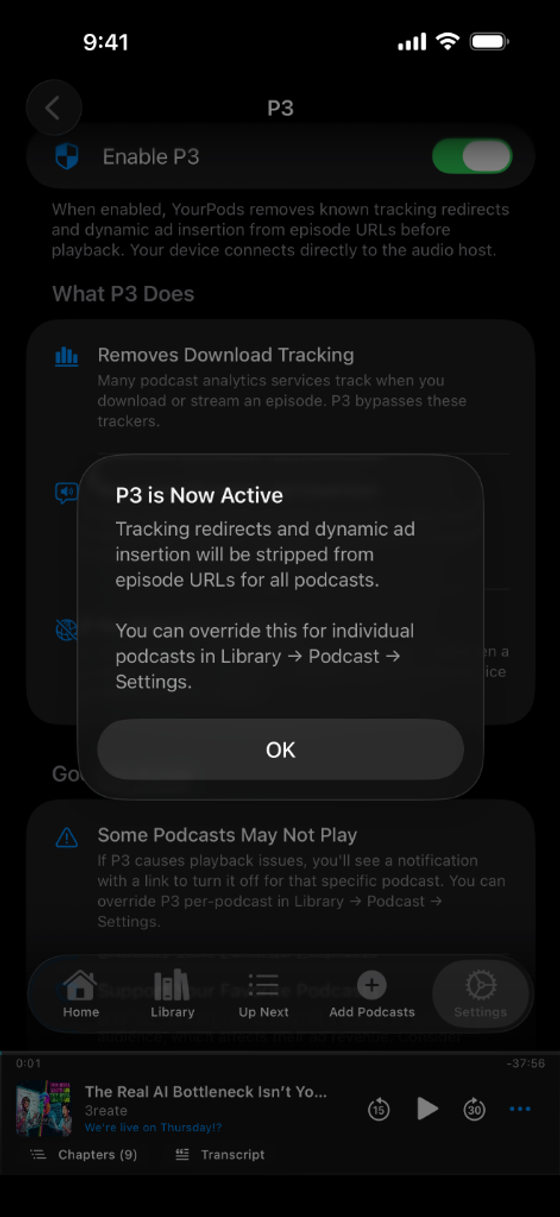
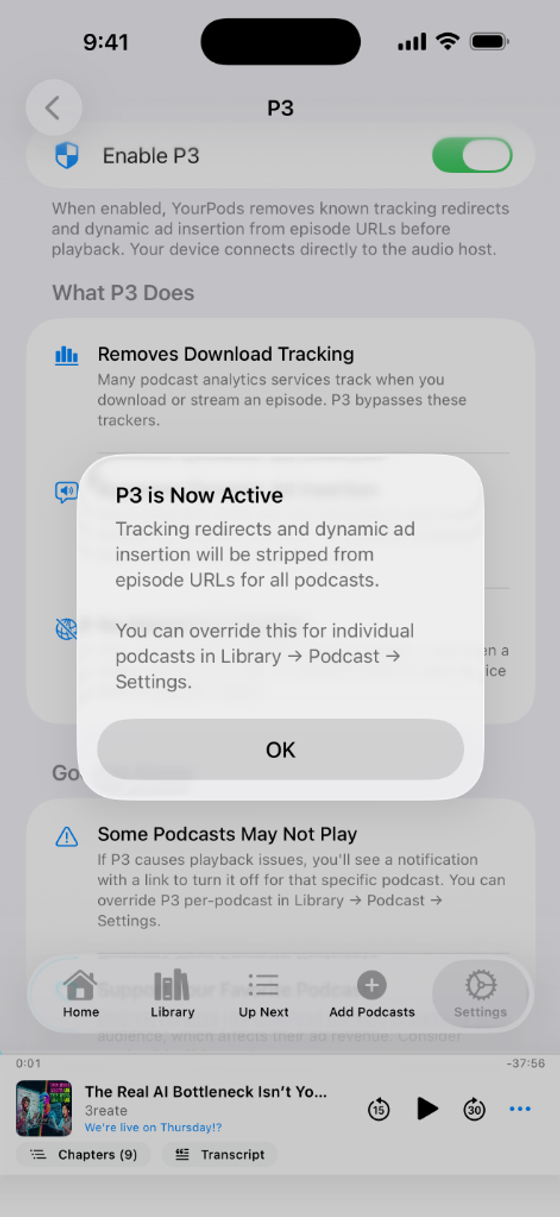
Strip trackers before playback.
P3 removes 39 tracking prefixes across 25 analytics services from episode URLs before audio ever reaches your device. Switch it on globally or per-podcast. A green shield on Now Playing confirms you're protected.
- Matches trackers by host, so a changed URL shape still gets caught
- Off by default — one switch in Settings, then it runs on its own
- Green shield indicator on Now Playing when active
- Per-podcast toggle for granular control
True privacy. Total control.
We believe your listening habits belong to you — and only you.
Read our Privacy Policy →Self-Hosted Sync
Connect your own gPodder server — Nextcloud gPodder Sync, NextPod, RePod, or any compatible service. Sign in to Nextcloud through your browser, with 2FA and SSO supported. Your data lives on infrastructure you control, and there is no account with us and nothing more to pay.
Zero Tracking
No analytics. No ads. No data harvesting. Your listening habits belong to you and never leave your device.
Vault Mode
No server needed. Vault Mode keeps everything on-device — your subscriptions, queue, and listening history never leave your phone. Full functionality, zero sync.
Share & Own Your Data
Share an episode, a show, or the exact second you are listening to — a real link, no account needed. Import and export your library via OPML, and your notes as Markdown. Your podcast data always belongs to you.
Want more? Add Pro.
Seamless handoff between iPhone, web, and Mac. Your queue, position, and library stay perfectly in sync.
The $4.99 app already includes every playback feature, and self-hosters get sync for free. Pro is an optional cloud service — nothing in the app is locked behind it.
Web Player
Stream in any browser with full playback controls, queue management, and chapters.
Notes on the Web
Capturing notes and exporting them is free in the app. Pro syncs them to the cloud and lets you read and edit them in the browser.
Offline Downloads
Download episodes in your browser for offline listening anywhere.
Listening Stats
Beautiful dashboards with per-podcast breakdowns, streaks, and trends.
gPodder Bridge
Mirror your own Nextcloud both ways, and point gPodder-compatible clients at your YourPods account.
Media Proxy
An IP-masking relay for the web player, plus full GDPR-compliant data export. P3 itself is free in the app.
The Details
Universal Purchase — seamless experience across iPhone, iPad, Mac, and Watch.
Library Management
- Subscribe via RSS feed URL or built-in search
- Create custom podcast groups, each with its own icon
- Filter: All, Downloaded, Unplayed, In Progress
- Sort by your own drag order, A–Z, Recently Updated, or Most Unplayed
- Episode order per show: Newest First, Oldest First, Season & Episode, or Unplayed First
- Select several episodes to mark played or unplayed, hide, or unhide — with Undo for 30 days
- Unplayed count badges and blue dot indicators
- Pull-to-refresh for instant feed updates
- Library Episodes view — one flat episode list across every show
- Episode search across titles, extended to descriptions on demand
- Auto-hide unplayed episodes older than 7–90 days, with Undo All for 30 days
- Arrange Home and the tab bar, and pick Quick Actions from eleven buttons
Queue & Playback
- AutoPilot queue with auto-add, priority push, and drag-to-reorder
- Sleep timer with timed presets and DriftOff Mode
- Favorite episodes — a tab, a Home section, and a Library filter
- A play button on every episode row, and Up Next one tap from the player
- Mark as Played from the mini player overflow menu
- Clear Queue — one-tap clear of Up Next with keep-current or stop-all options
- Hidden episodes — declutter feeds without affecting listening stats
- Seamless episode auto-advance with background execution
- Episode swipe actions — assign Add to Queue, Play Next, Mark as Played, Hide, Favorite, or Play Now
- Downloads screen grouped by podcast, date, or size
- Share an episode, a show, or the exact second you are listening to
- AirPlay picker in the mini player, and pause when headphones disconnect
CarPlay
- Three-tab dashboard: Library, Up Next, Recently Updated
- Choose three Now Playing controls from eight: speed, chapters, mark played, Trim Silence, Volume Boost, favorite, sleep timer
- Artwork thumbnails and real-time state sync
- Podcast author shown on Bluetooth displays
- Chapter artwork follows playback, and Now Playing works offline
Apple Watch
- Standalone watchOS companion
- Play downloaded episodes or stream directly
- Sleep timer and playback speed right on the watch player
- The system Now Playing page for Digital Crown volume and output routing
- Complications that show what is playing, what is next, and your queue count
- Progress from the watch survives an unreachable iPhone
Podcasting 2.0
- Chapters read from the audio file itself — ID3 in MP3, chapter atoms in MP4 and M4A
- Chapter artwork on the player, lock screen, Control Center, and CarPlay
- Transcripts in SRT, VTT, JSON, Markdown, RTF, plain text, and HTML
- Transcript search with match navigation and tap-to-seek
- Metadata: Explicit, Serial, Live, Funding, Value 4 Value
- Password-protected feed support with padlock badge
Sync
- YourPods Sync — free cross-device sync with now-playing handoff
- gPodder / Nextcloud self-hosted sync, free and with no YourPods account
- Sign in with Nextcloud through your browser — 2FA and SSO supported
- Custom gpodder.net server address support
- Per-episode version checks so two devices cannot overwrite each other
- Mark as Played retries until the server confirms it
- Listening positions stay inside their own sync profile
Notes & Widgets
- Timestamped episode notes with colours and comma-separated tags
- Add a note from a chapter or a transcript line, quoted for context
- Export as Markdown with YAML frontmatter, to Obsidian, or to your own Nextcloud
- Browse every note from the Library, grouped by episode and filterable by tag
- Now Playing widget in three sizes, with controls and your next four episodes
Insights
- Listening stats: total time, episodes completed, per-podcast breakdowns
- Listening Profile: speed, audio effects, skip intro/outro, AutoPilot, auto-download per show
- Episode Activity — chronological played-episode list with progress and device info
- Filter views: All, Downloaded, Unplayed, In Progress
Common questions.
Is YourPods free?
The YourPods app is a one-time $4.99 purchase — every feature is included and nothing is locked behind a subscription. The source code is freely available on GitHub under the GPL v3 license. YourPods Pro is a separate, entirely optional cloud service (web player, hosted sync, stats) that helps fund development; the app never requires it.
Does YourPods track me?
No. YourPods has zero tracking, zero analytics, and zero ads. Your listening habits stay 100% private on your device.
What is gPodder sync?
gPodder is an open sync protocol. YourPods supports gPodder-compatible servers like Nextcloud to sync your subscriptions and listening progress across all your devices without relying on corporate clouds.
Does YourPods work on Apple Watch?
Yes. YourPods includes a standalone watchOS companion that lets you download episodes, stream directly, and control playback — all without your phone.
Does YourPods work on a Mac?
Yes. The iPad app runs on any Mac with Apple silicon and macOS 15 or later, from the same purchase, and syncs with your iPhone and iPad.
Ready to switch to
true podcast freedom?
$4.99 once. Every feature included. No ads, no tracking.
Available on iPhone, iPad, Mac, Apple Watch & CarPlay.
Full app, one price. No subscription required.